
HINTS AND TIPS
Don't Only Automate Your Testing
Is automated testing always the best way to test your software? The cost-benefit doesn't always stack up, and manual testing can be cheaper and faster than you think.

If you're trying to decide between manual testing and automated testing, you're asking the wrong question. In reality, most teams rely on both to build effective testing strategies.

By Stef
August 12, 2025



hen it comes to manual vs. automated testing, the real challenge is understanding which approach suits different types of testing, and when to apply each for the best results. Too many teams get this wrong by treating manual testing like training wheels – something you do until you "graduate" to full automation.
That's backwards thinking, and it's why so many testing strategies fall flat despite heavy investment in automation tools and processes.
At a glance
The industry has convinced teams that "proper" testing means automating everything. The more automated your tests, the more sophisticated your team must be. It's a seductive idea, but it's often counterproductive.
Teams spend months trying to automate tests that would take minutes to run manually. They maintain flaky test suites that fail more often than the actual product. They write elaborate automation for features that change constantly, then spend more time updating tests than actually testing.
Meanwhile, real bugs slip through because automated tests only catch what you specifically programmed them to look for. They can't spot the weird edge case, the confusing user flow, or the thing that just "feels wrong" when you use it.
And this isn't manual testers grumbling about automation. The sharpest criticism comes from teams who automate heavily. Nubank deleted its entire end-to-end test suite after working out that for every 1,000 runs it got 42 failures and just one real bug – while bugs were still reaching production behind green builds. Martin Fowler calls non-deterministic tests "a virulent infection that can completely ruin your entire test suite". The pattern they describe is the same: the suite stops protecting you from bugs and starts protecting bugs from being noticed.
Both manual and automated testing aim to answer the same question: does this thing actually work for users? The difference is in how they do it – and the kinds of problems each one’s good at catching. Let’s break it down:
Automated testing works best for:
Manual testing excels at:
These aren't competing approaches – they're solving different problems.
Plenty of testing resists automation, for different reasons. Some of it needs human judgment a script can't fake: exploratory testing, usability and UX, accessibility, and the visual "does this actually look right?" checks. Some of it could be automated but isn't worth it: one-off tests, features that change every sprint, or anything where writing and maintaining the script costs more than running the check by hand. And some of it, like user acceptance testing, is about whether the software solves a real problem, which no assertion can decide.
Exploratory testing is the clearest case of the first kind. You can't script curiosity or automate intuition. When a tester notices something feels off – maybe the loading spinner behaves strangely, or an error message doesn't quite make sense – that's human intelligence finding problems that no predetermined test would catch. We talk more about this in our blog, What Is Exploratory Testing?
It's not about following steps. It's about investigating – trying unexpected inputs, exploring unusual user flows, noticing inconsistencies a script would sail right past.
User acceptance testing is the clearest version of that last point. You can automate whether a feature technically works, but you can’t automate whether it actually solves the business problem it was designed for. This, along with whether real users find it intuitive and whether it fits naturally into their workflow, requires human judgment.
Whole domains land here too. Games are the obvious one. You can automate a build smoke test or a load test, but not whether a level is fun, whether the controls feel right, or whether a physics moment looks convincing. Add the huge, often random state space of a real game and automating the core experience gets expensive fast, which is why studios still lean hard on human playtesters.
And if the question on your mind is AI rather than scripted automation, we take that one on in why manual testing matters.
It's easy to think automation will save you time, but it's not that straightforward. The setup costs and maintenance often eat up more time than you'd expect, especially when teams try to automate everything right away.
Take regression testing – the kind that seems like an obvious candidate for automation. You don't actually have to start there.
Instead, build your regression coverage manually first. Every time you fix a bug, add a check to your list. Every time you release a feature that could break existing functionality, add relevant checks. You'll quickly build comprehensive regression coverage without any automation overhead.
Then – and only then – promote specific tests to automation when it actually makes sense. Maybe it's the payment flow that's complex and business-critical. Maybe it's the user registration process that breaks frequently. But that rarely-changing admin settings page? Probably fine to keep checking manually.
Not always. Manual testing is often quicker, especially once you account for the real costs – which surprises teams raised on "automation is always faster" thinking.
Take a simple example: testing that a contact form sends emails correctly. You could spend hours writing an automated test that sets up test email accounts, sends messages, checks inboxes, and cleans up afterward. Or a human could fill out the form and check their email in 30 seconds.
The automation might save time if you're running that test hundreds of times. But many tests aren't run hundreds of times. They're run a few times per release, for features that change occasionally. The setup and maintenance cost of automation often exceeds the time it saves.
Don't forget the hidden costs: debugging flaky tests, updating tests when features change, and the context-switching overhead when automated tests fail for unclear reasons. A human can quickly verify whether a failure is a real bug or just a test issue. Automation can't. And a flaky test you decide to live with isn't a one-off cost – it taxes the team a little every week, forever, until someone fixes it or trust in the whole suite dies.
| Manual testing | Automated testing | |
|---|---|---|
| Best at | Exploratory testing, usability, edge-case discovery, user acceptance testing | Unit tests, regression, load testing, integration checks |
| Setup cost | Minutes – write a checklist and start | Hours to days per test, plus the infrastructure around it |
| Maintenance | Low – update a line when the product changes | High – scripts break when the product changes, and brittle suites need constant repair |
| Speed | Faster for tests you run a few times per release | Faster for tests you run hundreds of times |
| Consistency | Depends on tester skill and attention | Identical execution every time, can run overnight |
| What it finds | Problems you didn't know to look for | Only what you specifically told it to check |
| When it fails | A human can skip or fumble a check | Flaky failures waste time and erode trust in the whole suite |
| Scales | Poorly for high-volume repetition | Well, once the tests are stable |
It’s not manual versus automated testing – it’s about using the right tool for the job. Manual testing often brings more value than teams expect, but that doesn’t mean automation doesn’t have a role. It’s all about knowing where each one makes the biggest impact.
Choose manual testing when:
Choose automated testing when:
Start with manual and promote to automation when the math makes sense.
Traditional test case management tools assume manual testers need rigid, step-by-step scripts. Click here, type this, expect that result. It's micromanagement disguised as process.
But real manual testing – especially exploratory testing – doesn't work that way. Testers need room to think, investigate, and adapt. They need structure without straitjackets.
The best manual testing tools provide guidance without getting in the way. They help testers stay organized and track progress without dictating every action.
This is where Testpad's checklist approach makes sense for real-world manual testing.
For regression testing, you can build your checklist organically. Add checks when you fix bugs, remove them when you automate specific tests. The list evolves naturally with your product.
For exploratory testing, checklists work like flexible investigation prompts. Instead of rigid test cases, you create prompts like:
It's specific enough to ensure coverage without prescribing every click. Testers can investigate each area thoroughly while staying focused on what matters.
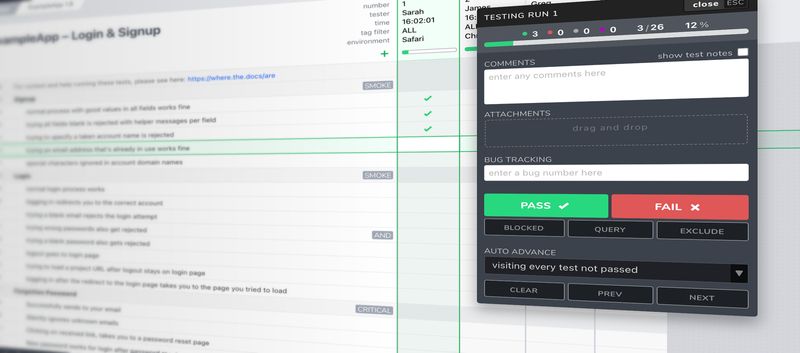
Compare this to traditional test case tools that force formal documentation for every possible scenario. That works fine in highly regulated industries, but it's overkill for most teams. You end up spending more time managing test cases than actually testing.
The goal isn’t to choose between manual and automated testing – it’s to use both where they work best. A smart testing strategy balances human creativity with automated efficiency, instead of forcing everything into one approach.
Manual testing isn’t something you grow out of. It’s what you use when human judgment is the best tool for the job.
So stop treating manual testing as a stepping stone to automation. Start seeing it as a strategic choice. Some testing should always stay manual because that’s where it’s most effective. Other testing can – and should – be automated when the investment makes sense.
Ready to try manual testing that thinks the way your team does? Start your free 30-day Testpad trial – no card details needed.

If you liked this article, consider sharing
HINTS AND TIPS
Is automated testing always the best way to test your software? The cost-benefit doesn't always stack up, and manual testing can be cheaper and faster than you think.

EDITORIALS
The simple yet effective approach to testing that can transform your development process, helping you deliver more reliable software through human insight and real-world usage scenarios.

EDITORIALS
Software testing is about discovery. It involves exploring software to understand its quality and giving stakeholders the information they need to make better decisions. But testing can veer off course.