
EDITORIALS
Complete guide to compatibility testing
Need to get to grips with all things compatibility testing? This handy guide walks you through exactly what it means, when you’ll need it, the various types, and the tools that make it simpler.

The software testing process is how you organize testing work to find problems before users do. It's the sequence of activities from planning what to test through to reporting results.

By Pheobe
March 5, 2026
Share this article


ypical software testing explanations rely on complex diagrams, formal phases, and lengthy approvals, making the process seem rigid and linear. That might suit large, regulated projects, but for many teams it’s overkill. In reality, testing adapts to the team. Small teams test continuously as features are built. Larger teams may have defined phases but still adjust as they go. Startups often keep things informal, while enterprises rely on detailed strategies.
What matters isn’t the methodology. It’s consistently answering “does this work?” and “are we ready to ship?” This guide covers the essential testing tasks every team needs, whatever their setup.
The testing process is the sequence of activities your team does to confirm software works correctly. The core activities involved often get broken down into phases: planning, preparation, execution, reporting, and closure – though not every team needs all five.
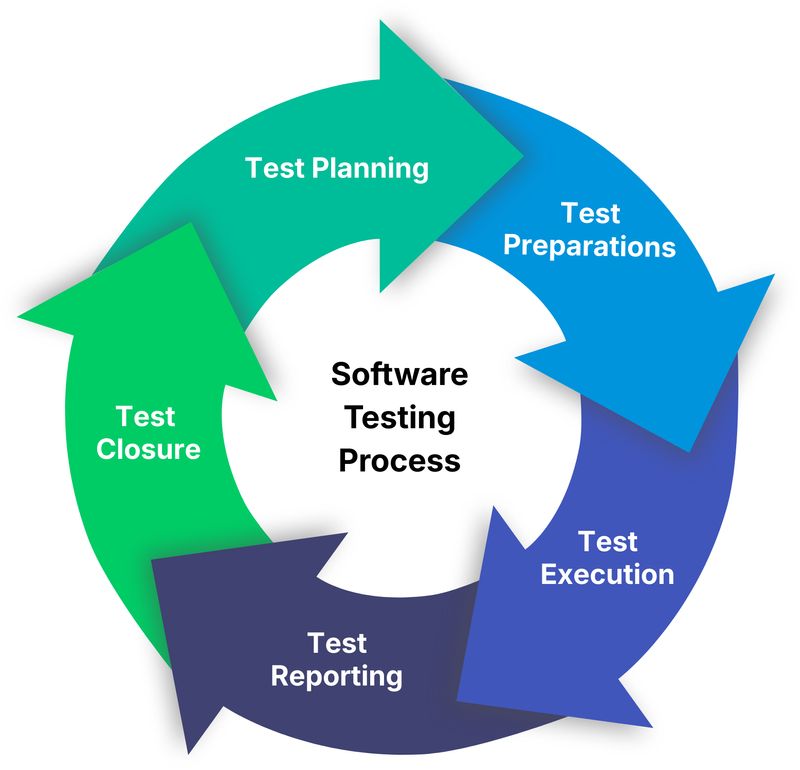
Think of it like checking a house before moving in. You walk through rooms looking for problems, make a list of what's broken, prioritize what needs fixing immediately versus what can wait, and decide whether it's livable or needs more work. The testing process works the same way – you're systematically checking your software, documenting problems, and helping stakeholders decide if it's ready.
The complexity varies wildly between teams. A three-person startup testing a web app has a very different process than a hundred-person team building medical software. But the core activities remain similar.
Even though testing processes vary from team to team, the work itself usually follows a basic flow. Teams just apply it differently depending on their situation.
Deciding what needs testing and how you'll approach it. For simple projects, this might just be a quick discussion about priority areas. For complex projects, it might involve formal test plans documenting strategy, scope, and resource allocation.
Key activities:
Some teams skip formal test planning entirely and just discuss priorities before each release. That works fine if everyone understands what matters most.
Getting ready to actually test. This means setting up environments, creating test data, writing test instructions if needed, and making sure testers have access to what they need.
Key activities:
How much preparation you need depends on your testing approach. Teams doing exploratory testing need less upfront work than teams following detailed test scripts.
Actually testing the software. Testers work through features, try different scenarios, document what they find, and log bugs when things break.
Key activities:
This is where most testing time gets spent. The goal is discovering problems while there's still time to fix them.
Communicating what testing found so stakeholders can make decisions. At minimum, this means showing what's been tested, what's broken, and how serious the problems are.
Key activities:
Good test reports answer the question "are we ready to ship?" without asking stakeholders to dig through raw test results.
Here’s how to carry out simple test reporting that actually works.
Wrapping up testing for the current release. This means double-checking that the big bugs are fixed, saving results for later, and noting what worked (and what didn’t).
Key activities:
Many teams skip a formal closure, and that's fine if you're tracking the important stuff (fixed bugs stay fixed, lessons get applied next time).
The phases above give a flexible outline, but every testing process includes a few essential steps teams always take to make sure the software works:
You can't test everything, so you need to focus on what matters most. This usually means:
Small teams often do this through quick discussions. Larger teams might maintain formal test plans or requirement traceability matrices.
Teams handle test instructions in different ways: some write detailed test cases, some give short prompts, and some just trust testers to know what to do. The right approach depends on your context. Teams with experienced testers doing exploratory work need less documentation, whereas teams with less experienced testers or more compliance requirements need more structure.
Knowing what's been checked and what hasn't prevents gaps in coverage. That could be via a test management tool, a spreadsheet, or just checkboxes – whatever works for your team. Many teams find that tools like Testpad hit the sweet spot between simple and structured. The important thing is being able to answer "what have we tested?" and "what's left to test?"
When you find a problem, record it so developers can fix it. A solid bug report covers what you were doing, what broke, how to reproduce it, and why it matters. You can track bugs in Jira, GitHub, a spreadsheet – basically whatever fits your team.
After developers fix bugs, verify the fixes actually work and didn't break anything else. This prevents the embarrassment of shipping software with "fixed" bugs that still occur.
Every time you fix a significant bug, add a test to catch it if it resurfaces. Over time, this builds a safety net preventing old problems from reappearing. Regression testing doesn't have to be automated to be valuable. Manual regression checks work fine, especially for tests that are difficult to automate.
No testing process is perfect. Understanding the mistakes teams make most often helps you catch problems sooner and spend your time testing smarter, not harder.
Teams new to testing often implement heavyweight processes before they need them. Formal test plans, detailed test cases and complex workflows slow things down without adding value for small projects. Start simple and structure only when you actually need it.
Not all features deserve equal testing attention. The login system matters more than the rarely-used admin panel. Recent changes need more scrutiny than stable code. Focus testing effort where problems would hurt most.
Teams sometimes jump straight to testing new features without verifying basic functionality works. If core features are broken, there's no point testing anything else. Always do sanity testing first.
Fixing bugs without adding checks to prevent reoccurrence means the same bugs keep coming back. Every time you fix something significant, add a test for it.
Testing finds problems so they can be fixed. If test results don't reach the people who need them, or bug reports lack detail developers need, testing effort gets wasted. Clear, concise reporting matters as much as thorough testing.
The right amount of process depends on your situation:
Startups and small teams usually need minimal process. Quick planning discussions, exploratory testing with light documentation, and simple bug tracking often suffice.
Growing teams benefit from more structure as coordination becomes harder. Written test instructions, clearer role definitions, and better tracking prevent things falling through gaps.
Regulated industries require formal processes with documented evidence. Healthcare, finance, and other regulated sectors need detailed test plans, traceability, and audit trails.
Mature products with established user bases need strong regression testing to prevent breaking existing functionality. The testing process should emphasize stability over exploring new features.
Start with what you need and add structure when specific problems crop up, rather than trying to use certain processes just because other teams use them.
If you’re new to structured testing, start simple:
For your next release:
That’s a testing process. Everything else is just refinement.
As your team grows:
Forget perfect processes at the start and just focus on catching problems before your users do.
The right tools depend on your needs:
Starting out: Spreadsheets work fine for simple testing. They're familiar, flexible, and free.
Growing teams: Dedicated test management tools help organize testing at scale. Traditional test case management tools suit process-heavy environments. Lighter tools like Testpad offer middle ground – more capable than spreadsheets but without heavyweight complexity.
Development platforms: Many teams use integrated tools (Jira, GitHub, GitLab) that combine test tracking with bug management and project planning.
Choose tools that fit how your team actually works, not how you think testing should work.
The software testing process isn't about following a specific methodology or using particular tools. It's about consistently answering "does this work?" and "are we ready to ship?" in a way that fits your team and situation.
Start simple, test the important stuff first and add structure only when you actually need it. Everything else is details.
Want practical testing advice delivered to your inbox? Subscribe for straightforward tips on making testing work better.

If you liked this article, consider sharing
EDITORIALS
Need to get to grips with all things compatibility testing? This handy guide walks you through exactly what it means, when you’ll need it, the various types, and the tools that make it simpler.
EDITORIALS
Writing test scripts can be straightforward, but the industry's jargon can make it seem overwhelming. Learn what test scripts are, why they're important, and how to start writing them.

EDITORIALS
There are many types of software testing – exploratory, regression, system, integration, UAT, performance, security – all useful, and all with their own distinct place in a test strategy.