
EDITORIALS
What is test management?
The term "test management" sounds technical, maybe even a bit formal. But really, it just means organizing how you test software. And the good thing is, you’re probably already doing it.

System testing is a key stage in software testing where you check that the entire system works together as expected. Instead of testing individual features in isolation, system testing looks at the full product, making sure everything behaves correctly in real-world conditions before release.

By Testpad
January 14, 2026


ystem testing is the stage where you test a complete, integrated software system against its specified requirements. Where unit and integration testing check the parts, system testing checks the whole product working together. It comes after those stages and before user acceptance testing (UAT), as the last internal checkpoint before real users see the software.
At a glance
The rest of this guide covers the definition and an example, how system testing compares with other types of testing, the main types, and how to get started.
System testing is the process of testing a complete, integrated software system to verify that it meets specified requirements. The ISTQB Foundation syllabus puts it the same way: system testing "focuses on the overall behavior and capabilities of an entire system or product". It checks whether your entire product works as a whole in the way it should. It isn’t any more complicated than that – even though some tools and testing resources make it feel more complex with lots of jargon and complicated explanations.
You can think of it as the stage when everything comes together. Once you’ve tested the individual parts of your product or software individually, system testing makes sure that they all work together as they were designed to do.
If you have an e-commerce site, you might have tested that the login screen, payment system and shopping cart functionalities all work properly – but you then need to do system testing to make sure that they all work smoothly together.
So your system testing would look at how it all works together, which might include things like:
While the premise of system testing isn’t complex, it can sometimes be helpful to know what something doesn’t do, in order to better understand what it does do. So, with that in mind, here’s what system testing doesn’t cover:
When it comes to system testing vs unit testing, then, the main difference is the level of focus: unit testing (and component testing) checks individual parts of the software to make sure each function or component works on its own, while system testing looks at the whole software system to ensure all parts work together properly. Unit, component and integration testing are all typically done by developers as part of the software development process.
All of these types of testing, as well as system testing, are done before user acceptance testing. This comes after the internal testing done by your team, when the QA team thinks the product or software is ready for your client or end user.
System testing also shouldn’t be confused with software testing, which is a more general term for the entire process of testing software, while system testing is one of the component parts, along with unit testing and component testing.
Here’s how the levels compare side by side:
| Test type | Scope | Usually run by | When |
|---|---|---|---|
| Unit testing | Individual functions or units in isolation | Developers | During development |
| Integration testing | How components work together | Developers or QA | After unit testing |
| System testing | The complete, integrated system | QA testers | After integration testing |
| User acceptance testing (UAT) | The full product against real user needs | End users or clients | After system testing |
System testing matters in any test plan because it makes sure that all the parts of your system work together as expected. When you do system testing, you can check that the entire system behaves as intended as a whole. It helps you to identify any potential problems that might not have been found during earlier phases of testing like unit or integration testing, reducing the risk of bugs or failures after you deploy.
The benefits of system testing include the following:
But there are also some potential challenges you might face with system testing:
These trade-offs are well documented on the automation side too. Martin Fowler’s test pyramid recommends lots of small unit tests and "very few high-level tests that test your application from end to end", and Google’s testing blog suggests a 70/20/10 split across unit, integration and end-to-end tests, partly because a failing whole-system test is harder to trace back to a cause. The lesson carries over to manual system testing: keep it focused on what only a whole-system test can tell you.
System testing is a broad umbrella term – there are various different types of tests that can be categorized as system testing. These can be broken down into functional and non-functional testing.
Functional testing checks if the system works according to the requirements, for example, checking whether the login feature works. It also includes regression testing. This checks that new features haven’t broken existing functionality, catching bugs that may have been unintentionally introduced. It’s often automated but can also be manual, and some teams consider it to be part of their system testing – but it can also be thought of as standalone testing.
Non-functional testing checks important aspects like performance, security and speed. These tests include:
It’s best to do system testing after you’ve completed unit testing (when all individual units of the system have been tested separately to make sure they work correctly) and integration testing (when you’ve checked that the different components or modules work together as expected).
Once these steps have been taken, you can carry out system testing, to look at the entire system as a whole to make sure that all the parts work together as you expect them to.
System testing should come before user acceptance testing (UAT), which is when your client or real users test the software to ensure it meets the requirements of the real people using it.
You’ll always want to do functional testing as part of your system tests, but it’s not always necessary to do every type of non-functional testing. The decision as to what types of system testing you do should be based on your system's specific needs.
Before signing off your system tests, it’s worth checking that you’ve covered the most important areas. A basic system testing checklist might include:
This helps ensure your testing stays focused on how the system will actually be used – not just how it’s meant to work on paper.
Remember, system testing doesn’t need to be complicated. Here are the steps you should take to make sure it’s simple, stress-free, and effective.
1. Make a test plan
In other words, you should outline your overall framework and strategy for testing.
2. Write your test scenarios and test cases
A test scenario is a high-level description of functionality to be tested, while a test case is a more detailed set of criteria for testing a feature or functionality.
3. Create test data
Make sure you have the information you need to validate your tests. This might involve creating sample accounts, transactions, or datasets.
4. Create the test environment
Remember, the test environment should mirror the production environment as closely as possible to ensure realistic testing conditions.
5. Conduct the tests
Run your tests to check if the system performs the intended functions correctly. You might, for example, test whether users can log in or make purchases as expected.
6. Document and report issues
As you test, document any issues or bugs you encounter. Provide detailed steps, screenshots, or logs to help the development team identify and fix the problem. You may want to use a bug tracking tool to log issues.
7. Test again
Once the development team addresses the bugs, retest the system to ensure the issues were fixed and no new problems were introduced.
8. Final testing and sign off
If the issues have been fixed, you can sign off the system for release. But if the issues persist – or if you discover any new issues – you’ll need to keep tweaking and testing until the problems have been resolved.
There are lots of different things you can test during your system testing, which means that you could quickly lose track of both the tests you need to complete and their results. So you might be considering a test management tool to help you stay on top of things.
We recommend keeping things simple – because there’s really no need to make testing more complicated than it needs to be. Testpad is a checklist-based testing tool: each test is a line of plain text, each test run is a column, and the resulting grid shows your coverage at a glance.
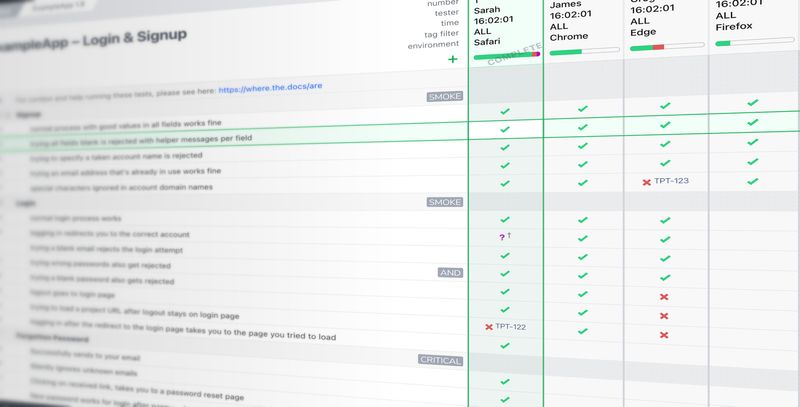
Some of the key features include:
If you want quick and easy system testing, Testpad could be the tool for you. Write and organize your tests fast, get through more testing, and share a report link so anyone can check progress at a glance. If you’re ready to kickstart your system testing, why not try our 30-day free trial today?
The goal of system testing is to check that the complete software system works correctly as a whole and meets the specified requirements.
System testing is usually carried out by QA testers or testing teams to provide an independent view of the system, although in smaller teams it may also be performed by developers or cross-functional team members.
It can be either. Many teams use a mix of manual and automated system testing, depending on the size of the system and the risks involved.
System testing should take place after unit and integration testing, but before user acceptance testing.

If you liked this article, consider sharing
EDITORIALS
The term "test management" sounds technical, maybe even a bit formal. But really, it just means organizing how you test software. And the good thing is, you’re probably already doing it.

EDITORIALS
Need to get to grips with all things compatibility testing? This handy guide walks you through exactly what it means, when you’ll need it, the various types, and the tools that make it simpler.

EDITORIALS | EXPLORATORY TESTING
Exploratory testing is essential to uncovering hidden issues and improving the quality of real-world usage. This guide covers what it is, when it pays off, and how to make it trackable.