
EDITORIALS
What is a test plan in testing, and how does it differ from a test case?
A test plan and a test case are not the same thing – but they work together. Here's what each one is and how Testpad handles both.

Testpad vs Testmo: test plans, not a test-case database
Testmo is a database-driven test management tool; Testpad is a checklist of plain text prompts. How they differ, and when each fits.

By Testpad
February 3, 2026
Share this article


he difference between Testpad and Testmo is structural. Testmo is a database-driven test case management tool: structured test cases stored as records, plus formal exploratory sessions, automation result ingestion, detailed reporting, and integrations with Jira, GitHub, and CI pipelines. Testpad is a plain-text checklist: each test is a line of text, and anyone, including people without an account, can run it. This page sets out that difference, where each tool is stronger, and how the costs compare, so you can decide which fits your team.
Testmo is a database-driven test case management tool. Each test is a record in a project repository with customizable fields and templates, a persistent ID, and a history of every run. Test runs execute those cases with pass/fail recording. Exploratory testing gets dedicated sessions with a defined scope, a time box, screenshot attachment, assignees, and a session workflow separate from structured execution. Automation results from any framework flow in through Testmo's CLI or REST API, so automated and manual results sit in the same view. A Reporting Center aggregates metrics across projects. It integrates with Jira, GitHub, GitLab, and CI pipelines at the data level, not just issue links.
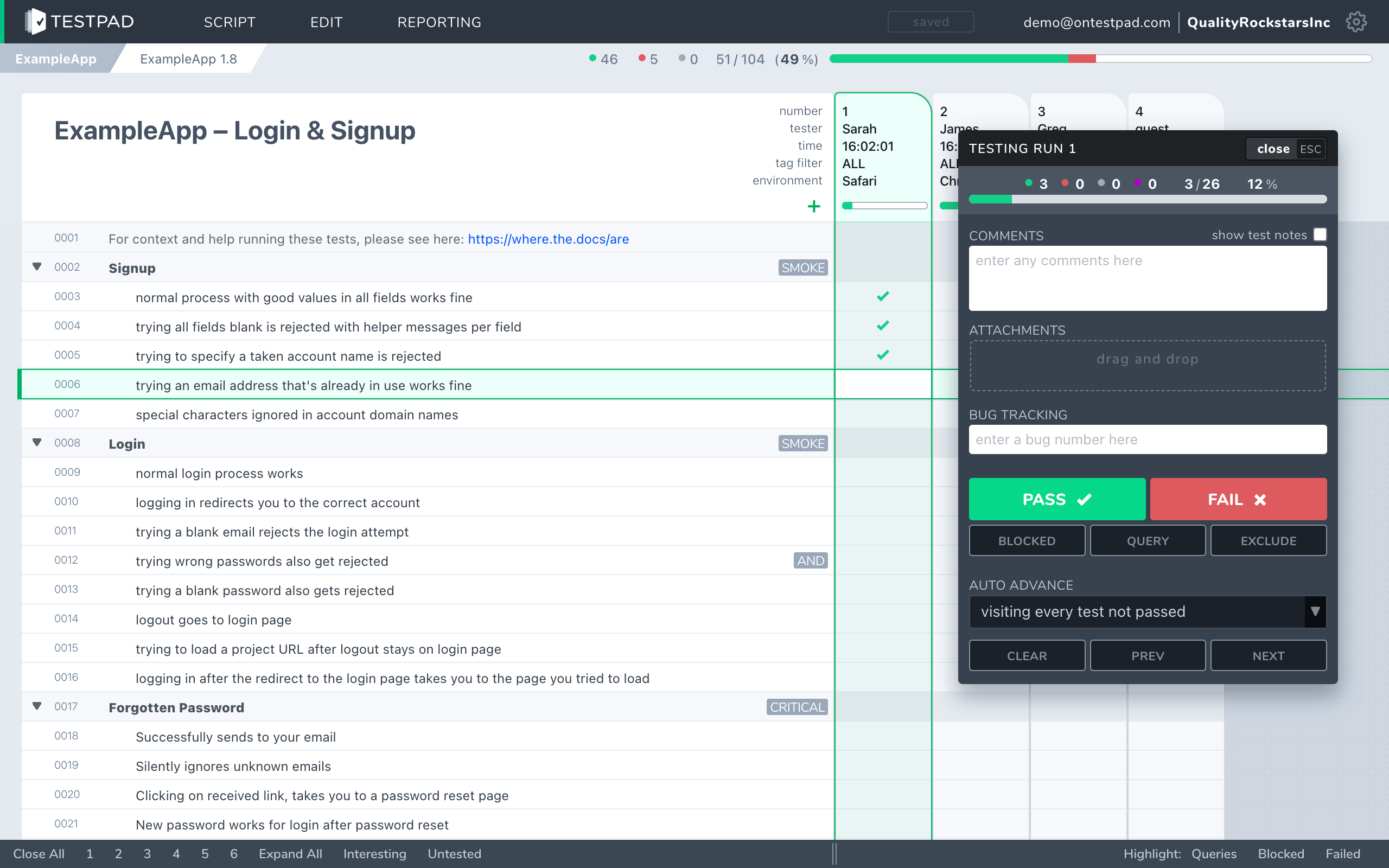
Testpad is built around the test plan as a document. A test is a line of plain text. Indenting builds structure: group related tests under a heading, or spell a longer test across several lines. Add a column for each test run and mark each prompt pass or fail as you work through it. There are no test case IDs, no per-run history per test, no formal exploratory sessions, and no automation ingestion. What Testpad has instead: you write the way you think, the plan stays as light as the testing needs, and you can invite testers, clients, or stakeholders to run a plan with no login and no seat through Guest Testing.
If you need automation results alongside your manual runs, per-test history, formal exploratory session records, or deep Jira integration, Testmo is built for that. If you want a fast checklist that anyone, inside or outside your org, can run without setting up an account, that's the gap Testpad fills.
A side-by-side comparison of the aspects that matter when choosing.
| Testpad | Testmo | |
|---|---|---|
| Data model | A standalone document: a nested outline of plain text prompts, a column per run | Structured test cases in project repositories; persistent IDs, fields, history, templates |
| Exploratory testing | Any checklist can be used for exploratory work; no formal session structure | Dedicated exploratory sessions: timed, scoped, screenshots, assignees, structured workflow (SBTM) |
| Automation ingestion | Not available | Via CLI or REST from any framework; automated and manual results in the same view |
| Guest / UAT testers | Share a link; no login, no seat, no account needed | Every tester needs a Testmo seat |
| Per-test IDs and history | Not today | Yes; each test case has a persistent ID and a full run history |
| Audit trail / permissions | Not today | Yes; audit log and per-user role permissions |
| Integrations | Jira, GitHub, Trello (light: issue IDs become links); REST API for automation results | Jira, GitHub, GitLab, CI pipelines; deep, not link-level |
| Reporting | Instant shareable report link | Reporting Center with QA metrics, dashboards, cross-project views |
| Pricing | From $10/user/month, guest testers free | $99/month for up to 10 users; $399/month for 1-25 users; $599/month per 25 users |
| Trial | 30 days, all features, up to 20 users | 21 days trial; no free tier |
| Best for | UAT, fast manual/exploratory, dev-led testing, small teams, open stakeholder access | Teams needing automation ingestion, formal exploratory sessions, Jira integration, QA metrics depth |
Testmo facts checked against testmo.com, June 2026.
Guest Testing opens UAT to people without an account. In Testmo, every tester needs a seat. Send a Testpad plan as a link to a client, a business analyst, a freelancer, or a stakeholder, and they're testing in minutes: no login, no account, no seat purchased. For UAT rounds where extra hands come in for a sprint and then leave, that means no Testmo seats to buy for them.
Less to set up before you can write a test. No project configuration, no test case form to fill out, no template to define. A Testpad plan is an outline you start typing. One customer described it as "just like writing... feels like you're writing a document." For teams who want to start testing on day one, that matters.
Lighter and faster for pure manual checklists. Testmo's structure is an asset when you need it, and extra weight when you don't. If your work is a mix of ad-hoc regression, UAT, and exploratory checking, and you don't need per-test IDs or session records, Testpad stays out of the way.
Cheaper for a very small team. Testmo's entry tier is sized for up to 10 users, at $99/month. A two or three-person team pays for that whole block. Testpad's Essential tier starts at three testers, so a small team starts lower than Testmo's ten-user block.
Write-as-you-think speed. Each test is a line of text: type a prompt, hit enter, type the next. The structure comes from indentation, not from filling in fields. That keeps the plan editable and lets you add, reorder, or cut tests mid-sprint without touching a case repository.
When your team needs the things a database-driven platform does and a plain-text checklist doesn't. Testmo ingests automation results from any framework via CLI or REST, so automated and manual testing sit in the same view; Testpad does not. Its exploratory sessions follow a formal SBTM structure, with timed scope, screenshot capture, assignees, and workflow, which records exploratory work in a way a plain checklist does not. Every test case has an ID, every run is recorded, and every permission is tracked, which a regulated or large-scale QA process may require. The Jira, GitHub, GitLab, and CI integrations are deep rather than link-level. And the Reporting Center and QA dashboards aggregate metrics across projects over time.
If your QA practice depends on any of those, Testmo covers them and Testpad does not. Our guide to TestRail alternatives covers tools in a similar space if you're still evaluating broadly.
When you want testing to be fast and open, and formal structure would be more overhead than the work needs. You run UAT with clients or stakeholders who aren't getting Testmo accounts. Your team is small enough that a tier sized for ten users is too big. You do regression, exploratory, hardware, or dev-led testing where a checklist is the right level of formalism. You want to invite someone in for a two-week sprint and then not worry about their seat afterward.
"We use Testpad to track all of our testing. It offers the depth and flexibility to model our entire test plan, but remains simple enough that onboarding new testers is effortless. The import and export facilities are really helpful for migrating test plans from other test management tools."
Eric Wolf, Senior Solutions Architect, Bell
For lightweight manual and UAT testing it can be. If your team depends on automation result ingestion, formal exploratory sessions with structured records, per-test history and audit, or deep Jira integration, Testmo is built for those things, and Testpad isn't today. The choice depends on which of those capabilities your work actually needs.
Testmo stores structured test cases in project repositories: customizable fields, templates, persistent IDs, a full run history per case. Testpad stores a test plan as a standalone nested outline of plain text prompts, with a column added per test run. No IDs, no per-test history, no repository.
Testpad does not ingest automation results today. Testmo does: results from any framework flow in via CLI or REST API and appear alongside manual results. If automation ingestion is central to your work, Testmo covers it and Testpad does not.
Yes. Share a plan link and a guest tests with no login and no Testpad account. Guest testers don't count toward your user seats. In Testmo, every tester needs a seat on the account.
Testpad is from $10/user/month, and guest testers are free, charged per person testing in Testpad. Testmo's Team plan is $99/month for up to 10 users; Business is $399/month for 1-25 users; Enterprise is $599/month per 25 users. There is no free Testmo tier; both tools offer trials.
Yes. Testmo includes an audit log and role-based per-user permissions. Testpad has neither today; if your process or compliance requirements depend on those, check before choosing Testpad.
Testmo has dedicated exploratory testing sessions: formal SBTM-style sessions with a timed scope, screenshot capture, assignees, and session workflow. A session is a structured record, separate from a structured test run. Testpad lets you use any checklist for exploratory work: scope a plan, explore within each prompt, and record what you find. Faster to start, but no formal session record or timed scope.
Testpad offers a 30 days free trial with all features and up to 20 users, no credit card required. Testmo offers a 21 days trial; there is no ongoing free tier.
The fastest way to choose is to write a real test plan in each. Testpad's free 30-day trial includes all features and up to 20 users, with no credit card and nothing to install. Paste in a set of your existing tests and see how they read as a plain-text checklist, with a shareable report link waiting the moment you finish the run.

If you liked this article, consider sharing
EDITORIALS
A test plan and a test case are not the same thing – but they work together. Here's what each one is and how Testpad handles both.

TESTING TOOLS
TestRail stores tests as case records in a database; Testpad is a nested checklist of plain text prompts. How they differ, and when each fits.

TESTING TOOLS
In Xray, every test is a Jira issue; Testpad runs test plans as a checklist of plain text prompts. How they differ, and when each fits.

TESTING TOOLS
Compare Testpad with TestRail, Xray, Qase and more: head-to-head pages, alternatives roundups and buying guides.