he difference between Testpad and Tuskr comes down to what a "test" looks like in each tool. In Tuskr, a test is a structured form: a case with steps, expected results, an auto-incrementing ID, and attachments. In Testpad, a test is a line of plain text in a checklist. This page sets out that structural difference, where each tool is stronger, and how the costs compare, so you can decide which fits the way your team actually works.
The short version
- Tuskr is a structured cloud test case manager: projects contain test suites, which hold test cases with numbered steps, expected results, and IDs like TC-1234. Test runs are assignable, have custom statuses, and generate PDF reports. Testpad holds a test plan as a nested outline of plain text prompts, with a column added per test run, marked pass or fail as you go.
- Tuskr has a free tier for small teams, plus a requirements module for traceability and automation result sync via CLI. Testpad has a 30-day trial rather than a free tier, but every paid plan includes all features.
- Teams choose Tuskr for structured test case management with steps and expected results, per-test IDs, requirements traceability, and a free starting point. Teams choose Testpad for fast, write-as-you-think test planning, a column-per-run grid that puts runs side by side, and guest testing that lets UAT participants or extra hands run a plan with no account.
- Tuskr is $9/user/month. Testpad is from $10/user/month, and guest testers are free.
- Neither choice is wrong. It comes down to whether you want tests to be structured cases with steps and IDs, or plain-text prompts in an outline.
What's the actual difference?
Tuskr is built around structured test cases. A test case has a title, a numbered list of steps, an expected result per step, an auto-incrementing ID (TC-1234), custom fields, and optional attachments. Cases live inside test suites, which live inside projects. When you run them, you create a test run: assign testers, set statuses, lock runs when they're done, and export a PDF report. There's also a requirements module for tracing coverage from requirement to case, and a CLI tool for pushing automation results in from CI. Tuskr integrates with Jira, GitHub, GitLab, and others for defect tracking.
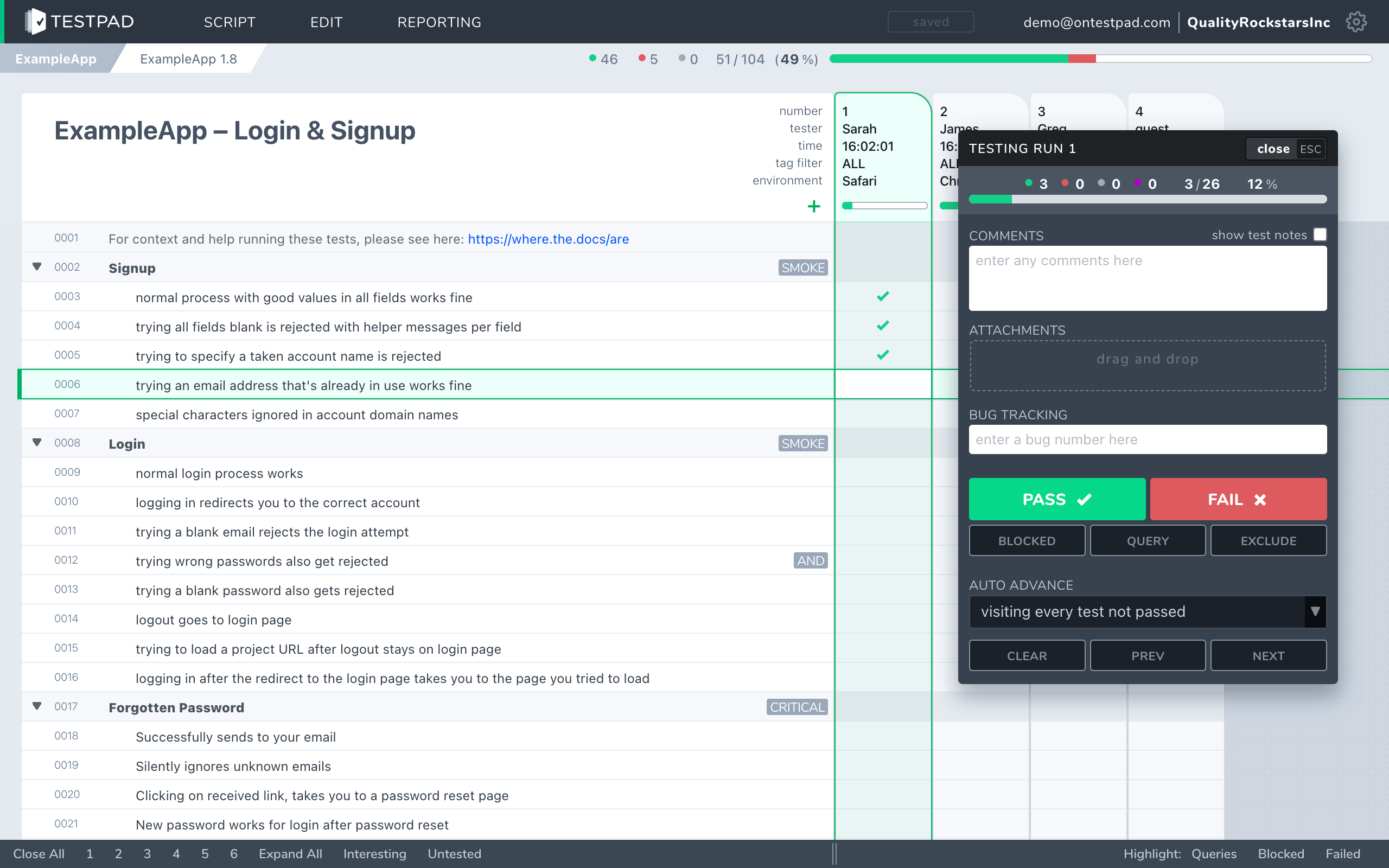
Testpad is built around the test plan, as a document. A test is a line of plain text. Indenting builds structure: group related tests under a heading, or break a bigger check into sub-prompts. Add a column for each test run and mark each line pass or fail as you go. Reports are shareable links, not exports. You write the plan the way you'd write a document, and anyone you share the link with can run it. Guest Testing lets you invite testers who don't have a Testpad account, useful for UAT rounds or bringing in extra hands without buying seats.
If your process depends on structured test cases with steps, expected results, and IDs you can reference in a defect tracker, Tuskr's model is built for that. If you'd rather a test stayed a line of plain text and your plan stayed readable by anyone, that's the gap Testpad fills.
How do Testpad and Tuskr compare?
A side-by-side comparison of the aspects that matter when choosing.
| Testpad | Tuskr |
|---|
| Data model | A standalone document: a nested outline of plain text prompts with a column per test run | Structured test cases with steps, expected results, and auto-incrementing IDs (TC-1234), inside test suites |
| Writing tests | Type a line, hit enter, repeat; indent to add structure | Create a case with numbered steps and expected results; attach files; set custom fields |
| Guest / UAT testers | Guest Testing: invite testers with no Testpad account for UAT or extra hands | Testers need a seat, even on the free tier; a client portal allows stakeholders to view results |
| Free tier | No free tier; 30-day trial includes all features and up to 20 users | Free tier for small teams |
| Requirements traceability | Not today | Requirements module: link cases to requirements and track coverage |
| Automation results | Push from CI via REST API; Gherkin-style syntax supported | CLI tool for syncing automation results; integrations with common CI tools |
| Per-test IDs | Not today | Yes; auto-incrementing IDs (e.g. TC-1234) |
| Audit trail / permissions | Not today | Lockable runs; user roles within projects |
| Reports | A shareable live link | PDF export; customizable run reports |
| Integrations | Jira, GitHub, Trello (issue links); REST API for CI | Jira, GitHub, GitLab, Azure DevOps, Slack, and others |
| Pricing | From $10/user/month, guest testers free | $9/user/month; free tier available |
| Best for | UAT, regression, exploratory, dev-led testing; teams writing plans at pace | Teams wanting structured test case management with steps, IDs, and requirements traceability |
Tuskr facts checked against tuskr.app, June 2026.
Why do teams choose Testpad over Tuskr?
Writing a test takes one line. In Tuskr you fill in a structured form for each case: title, steps, expected results, custom fields. That's the right model if formal structure is the goal. In Testpad a test is a line of plain text: type it, hit enter, write the next. A 20-item regression plan takes minutes to draft and reads the same way on day one as it does six months later.
The column-per-run grid. Each test run is a column in Testpad's grid, so you can see multiple runs side by side in the same view. Pass rates across runs are visible at a glance without switching views or pulling a report.
Guest Testing. Send a Testpad plan link to a client, a product manager, or a freelancer: they run the plan and record results with no Testpad account and no seat to buy. Tuskr's testers need a seat (the free tier has a user limit), and there's a client portal for viewing results but not for running them directly. For UAT rounds, that means bringing in extra hands without buying each one a Tuskr seat.
Shareable live reports. Testpad reports are links, not exports. Share the URL and the recipient sees the live state of the run. Tuskr produces PDF reports, which are a snapshot at export time.
Cost follows your testers. Testpad is from $10/user/month, and guest testers are free, billed for people testing in Testpad. Guest testers don't add to the seat count. Tuskr's free tier covers small teams, but its paid tiers scale in cost per user.
When is Tuskr the better choice?
When your team needs structured test case management with steps, expected results, and per-test IDs from the start. Tuskr's data model is built for teams that want cases referenced by ID in a defect tracker, requirements linked to coverage, and PDFs as deliverable reports. It has a free tier, integrations with Jira, GitHub, GitLab, Azure DevOps, and Slack, and automation result sync that handles hybrid manual-and-automated QA workflows without a separate tool. If that structure is what your process requires, Tuskr covers it and Testpad does not.
When is Testpad the better choice?
When you want to write a test the way you'd write a list, and open that list to people outside your QA team. You run UAT with clients or stakeholders, do exploratory and regression work, or your developers test their own code and a structured test case per check is more ceremony than the testing actually needs. Teams of that shape get going in minutes, keep plans light enough to stay current, and use Guest Testing to bring in non-testers without buying seats.
"We use Testpad to track all of our testing. It offers the depth and flexibility to model our entire test plan, but remains simple enough that onboarding new testers is effortless. The import and export facilities are really helpful for migrating test plans from other test management tools."
Eric Wolf, Senior Solutions Architect, Bell
Common questions
Is Testpad a replacement for Tuskr?
For light, fast manual and exploratory testing it can be: UAT, regression, dev-led testing, ad-hoc checks. If your process depends on structured test cases with numbered steps, per-test IDs, requirements traceability, and a free tier to start on, those are things Tuskr has today that Testpad doesn't.
What's the actual difference in the data model?
Tuskr stores test cases with numbered steps, expected results, and auto-incrementing IDs inside test suites. Testpad stores a test plan as a nested outline of plain text prompts, with a column added per test run.
Does Tuskr have a free tier?
Yes. Tuskr has a free tier for small teams. Testpad doesn't have a free tier; it offers a 30-day trial that includes all features and up to 20 users, with no credit card required.
Can clients or non-technical people test in Testpad?
Yes. Testpad's Guest Testing feature lets you share a link with someone who has no Testpad account; they run the plan and record results without buying a seat. In Tuskr, running tests requires a seat; there's a client portal for viewing results, but external testers generally need an account to run tests themselves.
How does pricing compare?
Tuskr starts at $9/user/month with a free tier for small teams. Testpad is from $10/user/month, and guest testers are free, with every paid plan including all features. The right comparison depends on team size and whether the free tier or the trial fits your evaluation style.
Does Tuskr handle automation results?
Yes. Tuskr has a CLI tool for syncing automation results into test runs, and integrates with common CI tools. Testpad accepts results from CI via its REST API and supports Gherkin-style syntax for BDD-flavored plans, but doesn't run automation itself.
Does Testpad have per-test IDs or an audit trail?
Not today. If your process requires per-test IDs that you can reference in a defect tracker, or audit logs for a compliance process, Tuskr has both; Testpad doesn't, and it's worth checking before you switch anything over.
See the difference in five minutes
The fastest way to choose is to write a real test plan in each. Testpad's free 30-day trial includes all features and up to 20 users, with no credit card and nothing to install. Paste in a chunk of your existing tests and see how they read as a plain-text checklist.