User Acceptance Testing without the spreadsheets
Your business users have day jobs. Send them a link instead of a spreadsheet: a plain-language checklist in the browser, no login, no training, with results arriving as they work through it.







Testers just open a link
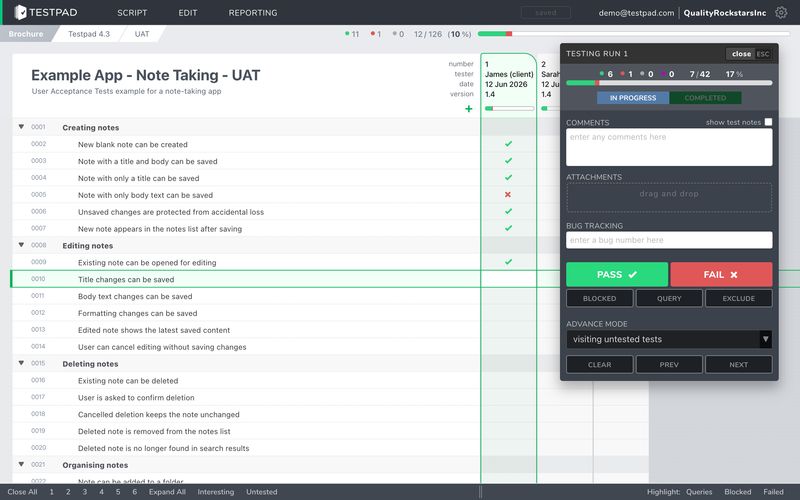
UAT stalls when testing means accounts, training, and a tool built for QA professionals. A Testpad guest link skips all of it: your tester opens a checklist in the browser, reads what to try in plain language, and marks pass or fail as they go. Nothing to install, nothing to learn.
And because the list says exactly what needs trying, nobody is left guessing what to test, and 'looks good to me' stops being the only feedback you get.


“I was looking at 16 different tools before I stumbled across Testpad. It's simple and quick to use (easy enough to have business people use it with very little training). Reporting is simple and effective, making it clear who has tested what and where the bottlenecks are. Take a look – highly recommended.”

Adrian Wright
Business Process and IT Strategy
An acceptance plan in plain language
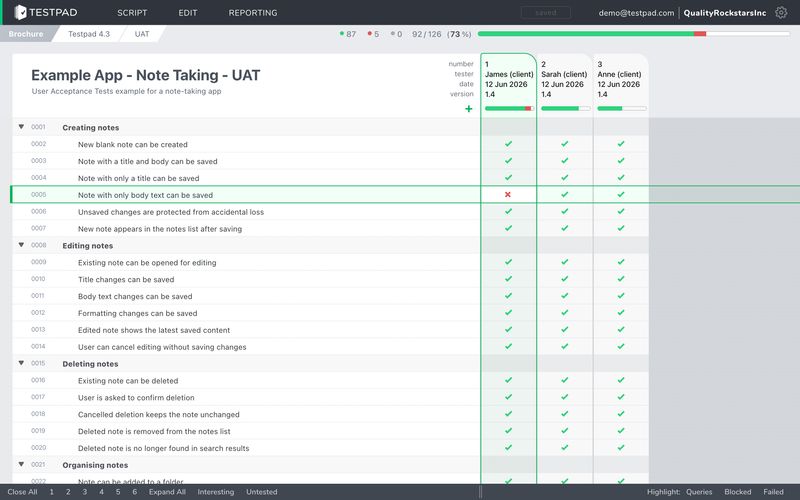
Write the plan the way you'd explain it: one line for each thing the business needs to see working. Take the lines straight from your acceptance criteria or user stories, indent to group them by area, and you have a UAT plan in an afternoon rather than a week.
When requirements move mid-project, edit the plan in seconds. No forms, no test case fields, nothing for a business user to decode.
“Testpad has been a reliable and effective part of our test management procedure for years. It fulfils completely the compromise between productivity and formality, saving us from the headache of trying to do it with spreadsheets.”

Nick Kenyon
Head of Operations, Numed Healthcare
See who's tested what, without asking
Results land in the plan as testers work, so progress is something you look at rather than something you chase over email. You can see who's started, what's failing, and what nobody has touched yet.
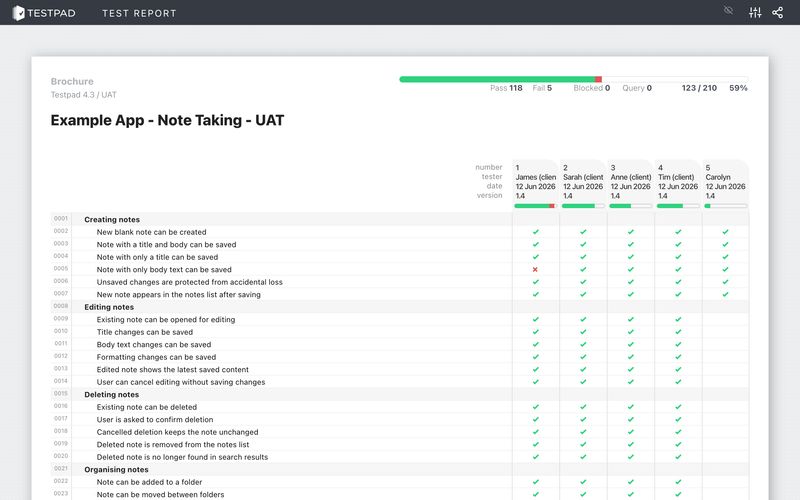
When UAT wraps up, the report is your record: what was tested, what was accepted, what was outstanding when you shipped. Share it as a guest link, or save it as HTML or a PDF and attach it to the acceptance email.
























AND NOT JUST FOR UAT, ALSO USED DAILY BY

QA Teams
Software Developers
Hardware Teams
Where Testpad fits in your UAT
Client UAT at an agency
When the client has to accept the build before launch
Send the client a guest link to the acceptance checklist. They work through it in the browser, their results and comments land in your plan, and the report gives both sides the same record of what was accepted. No client logins, and no 'can you re-send the spreadsheet'.
Business acceptance of internal systems
When ops staff test the new ERP between meetings
The people who know the process best are busy running it, so the plan has to meet them where they are: a short list of real scenarios in plain language, tried whenever they have twenty minutes, with results collected without a single status-chasing email.
The same checks before every release
When acceptance is a routine, not a one-off project
Copy the plan each cycle and give the new release clean columns, with last release's results kept alongside for comparison. Over time the plan becomes the definitive list of what has to work before you ship.
Accepting a supplier's delivery
When you're the client and the vendor says it's done
Work through the agreed list item by item, record what passes with evidence attached, and keep the report for the conversation when something doesn't. A written record beats a meeting memory.
What you can and
can't do with Testpad
What you can do with Testpad
Write the acceptance plan in plain language
Take prompts straight from acceptance criteria
Send testers a guest link, not a login
Watch results arrive as people test
Collect comments next to each item
Attach screenshots as evidence
Save the final report as HTML or PDF
Copy the plan for the next release
Link failures to Jira or any issue tracker
Look organized in front of clients
What you can't do with Testpad
Train business users on a QA tool

Email a spreadsheet and hope
Decode 'looks good to me'
Chase stakeholders for status updates
Merge feedback from three email threads
Wonder who tested what before go-live
Let acceptance live in a meeting memory
Find the broken checkout after launch
PRICING
What Testpad costs
Essential
$49 $59
per month, billed annually per month, billed monthly
A basic account for 1, 2 or 3 testers
Team
$99 $119
per month, billed annually per month, billed monthly
Fully featured, for teams up to 10 testers
Team 15
$149 $179
per month, billed annually per month, billed monthly
Fully featured, for teams up to 15 testers
Department
$249 $299
per month, billed annually per month, billed monthly
Fully featured, for teams up to 25 testers
Every plan begins with a fully featured 30-day free trial, no credit card required. Bigger team? Custom plans with invoicing are available.
16 years, 1000s of customers and
over 100 million test results
“I was looking at 16 different tools before I stumbled across Testpad. It's simple and quick to use (easy enough to have business people use it with very little training). Reporting is simple and effective, making it clear who has tested what and where the bottlenecks are. Take a look – highly recommended.”
 Adrian Wright
Business Process and IT Strategy Testpad customer for 15 years
“Testpad has been a reliable and effective part of our test management procedure for years. It fulfils completely the compromise between productivity and formality, saving us from the headache of trying to do it with spreadsheets.”
 Nick Kenyon
Head of Operations, Numed Healthcare Testpad customer for 14 years
“In the past we used other test repositories but they were cumbersome and harder to use than a simple spreadsheet. For us, Testpad combines the visibility and quickness of a spreadsheet with a nice UI.”
 Stewart Warner
Managing Director, Foxhole QA Testpad customer for 7 years
“Testpad is flexible enough to create and reuse test plans lightning fast. This helps our team spend more time preparing to test, do the actual testing and report the final results.”
 Jason Hamilton
Founder and CEO, TestLauncher Testpad customer for 11 years
“We rely on Testpad to help us organize our test plans and help coordinate testing between multiple people within our organization. Testpad is a valued part our release testing process at Jackson River.”
 Phillip Cave
VP Product Development, Jackson River Testpad customer for 13 years
“We use Testpad to track all of our testing. It offers the depth and flexibility to model our entire test plan, but remains simple enough that onboarding new testers is effortless. The import and export facilities are really helpful for migrating test plans from other test management tools.”
 Eric Wolf
Senior Solutions Architect, Bell Testpad customer for 10 years
Common questions
Do business users or clients need Testpad accounts?
People who test regularly need an account on your plan. For business users, clients, and other occasional testers, send a guest link: they open the checklist in a browser, with no login and nothing to learn, and their results go into the same plan. Guest testing is included on Team plans and up.
What does a tester see when they open the link?
The checklist itself: a plain-language list of what to try, grouped by area, with results recorded against each line and room for comments. No dashboards, no setup, no QA jargon.
How do I record sign-off?
Testpad keeps the record rather than the ritual. The report shows what was tested, what passed, and what was outstanding at the moment you shipped; save it as HTML or print it to PDF and attach it to your acceptance email. There's no e-signature workflow, so formal approval stays in whatever process you use today.
Can testers attach evidence?
Yes. Screenshots and files attach to a test or its result, so the evidence stays with the item it belongs to.
We run UAT every release. Do we rebuild the plan each time?
No. Copy the plan, give the new release clean columns, and reuse the same checklist. Earlier releases keep their results, so you can compare across cycles.
Where can I read more about user acceptance testing?
We keep a full guide to user acceptance testing on the blog: what UAT is, who runs it, and how it fits into a release.
How much does Testpad cost?
Plans are flat-rate: the Essential plan is $49 a month billed annually ($59 month-to-month) for up to 3 testers, and fully featured team plans with image attachments and guest testing start at $99 a month for 10 testers. Every plan starts with a free 30-day trial, no credit card required.
Put the next release's UAT in Testpad instead of a spreadsheet.
Your testers just need a link.

NO SOFTWARE DOWNLOADS
NO CREDIT CARDS
NO SHENANIGANS