Exploratory testing is essential to uncovering hidden issues and improving the quality of real-world usage. This guide covers what it is, when it pays off, and how to make it trackable.
By Pheobe
March 26, 2026
Share this article
xploratory testing is a hands-on approach where testers actively explore software, using their knowledge and intuition to decide what to try next based on what they just learned. It finds the bugs that rigid, predefined test cases miss, because a thinking tester follows hunches no test author anticipated.
At a glance
Exploratory testing means designing and running tests at the same time, guided by what you find
It adds the most value on new features, user-facing products, and high-risk areas
Pure freestyle testing finds bugs but is hard to track, report on, or repeat
SBTM adds time-boxed sessions and charters, but its notes make poor reports
The pragmatic fix: a plan of test ideas detailed enough to track, loose enough to explore within
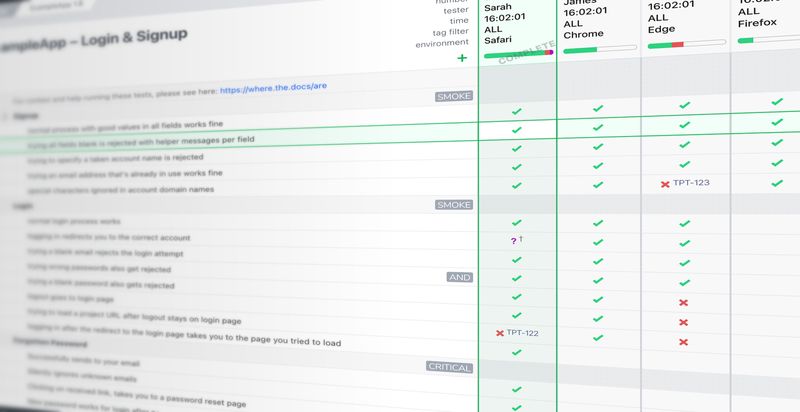
Testpad is built for this: each test is one line of plain text, with results recorded in a grid
The rest of this guide fills in the detail: what exploratory testing is, why teams shy away from it, and how a lightweight plan makes it manageable.
Exploratory testing is one of the best ways to find real issues fast. But instead of embracing it, a lot of teams stick with automation or rigid, predefined test cases because they seem faster, easier to track, and better for reporting. In the process, they miss the bugs only human intuition can catch.
Which is a shame, as the value of exploratory testing is undeniable. It fosters a deep understanding of the application, encourages creative problem-solving, and adapts to the evolving context of the project.
A big part of the problem is not knowing how to implement exploratory testing in real-world projects; projects that have managers who want to know answers to very unreasonable questions like “how much have you tested so far?”, or the outrageous “how much longer do you need?”. While there are some formalizations to exploratory testing, in our experience they’re not widely used.
So we present instead a simplified approach: keeping the benefits of human-driven testing but with some pragmatism thrown in to make it predictable, trackable and re-usable the next time. So let’s back up a bit: what is exploratory testing, and how does it work in practice?
What is exploratory testing?
Before we get into how to better approach exploratory testing, let’s first look at what it is.
“An approach to testing in which the testers dynamically design and execute tests based on their knowledge, exploration of the test item and the results of previous tests.”
Er…ok. Let’s try James Bach, whose classic essay Exploratory Testing Explained goes for the rather more concise:
“Simultaneous learning, test design and test execution”
(The same essay credits Cem Kaner with first putting the term in print, in his book Testing Computer Software.)
Better, but still not great. What exploratory testing is all boils down to:
“Making it up as you go along – with your brain engaged.”
This allows testers to choose what they do next based on what's just happened, to be reactive to what’s happening, to try test ideas inspired by their interaction with the product.
Exploratory testing is just making it up as you go along, with your brain engaged.
When does exploratory testing deliver the most value?
Exploratory testing doesn’t need to be everywhere. It works best when risk is high or user behavior is unpredictable.
Where exploratory testing adds the most value:
New features where it’s still unclear how people will use them
Products that customers interact with directly, where the experience matters most
Systems where mistakes could lead to real costs or damage your reputation
Complex setups that don’t follow simple step-by-step processes
Agile teams working quickly with lots of changes
Where it’s less critical:
Established products with predictable use
Internal tools used by trained staff
Low-risk updates or areas already covered by thorough automated tests
This isn’t about skipping steps but about focusing your time and energy where it will pay off.
To control or not to control?
To understand where exploratory testing fits in, it helps to consider the degree of control your testers have over their actions during testing.
Zero control is testing that is ad-hoc, purely freestyle, basically just using the software and trying to break it. On the other hand, full control is when every action and every expected outcome is spelled out in exacting detail.
Exploratory testing definitely includes zero control, purely freestyle testing. Exploratory testing definitely does not include the fully controlled extreme of rigid, spelled-out test cases.
So, how much in between these extremes counts as exploratory testing?
Well, it doesn’t really matter!
You can rightly argue that all testing is exploratory because it’s impossible to control every micro-action of a tester, removing all agency and independent thought. But that’s getting away from the point. If you’re leaving your testers free, let’s say somewhat free, then it’s exploratory.
If you’re controlling your testers to the point where anyone could do it, it’s not exploratory. In fact, at that point, you absolutely should be automating it (assuming it’s cost-effective to implement).
What are the advantages of exploratory testing?
It’s easiest to see the value of exploratory testing (a.k.a. not controlling your testers) when you contrast it with rigid, fully prescribed test cases at the other end of the spectrum.
Fully prescribed testing, whether carried out by humans or automated, can only find problems on the path the tester is taken down, the problems the test authors anticipated. Your known unknowns, if you like.
But if you want confidence you’ve found all the problems there are to find, you need to predict a lot of problems, which equates to a massive collection of test instructions. It’s like trying to color in a drawing with a thin pen. You need a lot of lines scratching back and forth before it begins to look at all filled in.
If you think this sounds sub-optimal, you’d be right.
What you need is an approach that makes it more likely you’ll find problems off the beaten track, more likely to uncover your unknown unknowns. And that’s exactly where exploratory testing comes in.
Exploratory testing is more likely to find your unknown unknowns
Exploratory-style testing achieves this precisely because it doesn’t try to define every step of the way. Instead, it leaves your testers free to use their intuition. To try out your product in the way real users might in the real world. To explore patterns of use and user behaviors the developers never even thought of. Even if they were embarrassingly obvious in hindsight. Doh!
In other words, exploratory testing is like doing that color fill with a marker pen.
Without getting qualitative, consider the likelihood of types of problems. Exploratory testing allows for (good) testers to dose their test effort looking for the more probable new bugs, than the less probable reoccurrence of old bugs. That’s not to say testing shouldn’t include checking the whole system, but testers will rightly intuit the new stuff that’s going to have the new problems and will invest more time and be more inventive in their tests of those features.
There’s also a human win…because your testers have a degree of agency and self-direction (along with active brains making active choices) they will inevitably be more engaged with the whole process. And who doesn’t want a more engaged team?
Side note: We should perhaps allow that there are specific situations where fully prescribed testing is in fact useful or even required. Regression testing would be a good example of building a growing collection of very specific (preferably automated) tests to ensure you don't break the same thing twice. Or in more regulated environments, controlling and recording exactly what was tested can be a matter of standards conformance – even if this means less effective testing in terms of maximizing how you learn about the state (readiness) of your product.
The disadvantages of exploratory testing
Exploratory testing is valuable and it’s simple to do. So why isn’t everyone doing it? Basically, it’s too simple.
Exploratory testing is often performed with no structure at all, the zero-control, purely freestyle approach discussed above. Just pick it up and get testing. And yes, this approach is better than no testing! It will certainly find a lot of bugs. But when your manager walks over, it’s hard to answer questions like “Are you done yet?”
This obviously doesn’t fly for real-world teams with little room or patience for unplanned activities that can’t be tracked or reported on.
Of course, managing exploratory testing isn’t a new problem, and formalizations exist to address the problems with controlling the uncontrolled.
What is Session-Based Test Management (SBTM)?
The most well-known is probably Session-Based Test Management (SBTM), introduced by Jonathan and James Bach at Hewlett-Packard in 2000. SBTM codifies some control on what would otherwise be a freeform process with the ideas of breaking testing up into time-limited sessions, with guides (charters) to define scope. Testers use the instructions to journal and take notes of the testing activity as it proceeds.
If we extend the flippant definition of exploratory testing from above, it becomes:
“For each of the following topics, spend X minutes making it up as you go along – with your brain engaged…and taking notes.”
Thinking back to the degree of control idea, SBTM comes in fairly low. There’s a charter with high-level items in it to guide the process, but within those items and within the time limits, testers can be very exploratory and are free to put their efforts where they see fit.
Thus, SBTM begins to help with at least the planning and tracking part. The charter (and time bounds) is a reasonable plan. And the notes taken against that plan certainly count as tracking.
However, this is often not enough from a project management point of view.
The notes that count as tracking also form the basis of reports on how testing went. The quality of such reports therefore depends heavily on the ability of the tester's note-taking skills. It’s quite tricky to be both complete and keep a lid on the verbosity.
Testers tend to either go all-in and make boring, long-winded records of every test idea performed, or they miss important information in an effort to economize (or through natural human laziness!)
These reports also only work as reports when they’re read through thoroughly. Without additional effort to paraphrase and condense the essential content, there’s no quick summary available as to what’s working and what’s not.
SBTM isn’t ideal for the testing team either. Teams like to evolve their process through time, learning from release to release, from sprint to sprint. With notes as the chief output, the next test cycle can only improve on the previous one if a tester re-reads all the notes from last time or if there’s a separate process to re-read notes and summarize key findings to be aware of next time.
The bottom line on SBTM is it’s a definite step up in making exploratory testing more useful from a management point of view. But still, no cigar when it comes to at-a-glance reporting and simple reuse for next time.
How do you make exploratory testing trackable?
So, how do you balance the value of exploratory testing against the reasonable needs of project management?
It’s actually not that hard. You just have to let go of the idea of leaving the tester completely free. Put some structure around the exploratory testing process but stop short of being too rigid in your control. Essentially, be more pragmatic about it.
Rather than leaving testers completely to their own devices, construct test plans that have significantly more detail in them than SBTM’s high-level charters. Aim for test plans that go into sufficient detail such that a “pass” is enough information to indicate a test idea is working.
At the same time, you need to make sure plans don’t have so much detail that testers have zero freedom. Testers need to be free to come up with their own ways to investigate the correctness of each test idea. Treat “tests” not as steps and expected outcomes but as ideas; ideas for experiments that the tester should explore.
Here’s how the approaches compare across the control spectrum:
Approach
What guides the testing
Tracking and reporting
Reuse next cycle
Freestyle (ad-hoc)
Tester instinct alone
None; bug reports are the only output
Nothing to reuse
SBTM
Time-boxed sessions with charters
Session notes; thorough but slow to read
Re-read last cycle’s notes
Pragmatic test plans
A list of test ideas to explore within
Pass/fail against each idea, visible at a glance
Reuse and extend the plan
Rigid test cases
Prescribed steps and expected results
Precise, but heavy to write and maintain
Reusable, at the cost of upkeep
To build this kind of test plan, you might wonder where to start. But, again, it’s not so hard. A good place to start is a simple list or mind-map of the high-level features, user stories, backlog items, or just the broad capabilities.
From there, embellish each item with further aspects, sub-features if you like, that you want testers to look into. And then iterate again, embellishing at more and more detail until you’re happy with the coverage but without spelling it all out in so much detail that you might as well automate it.
There’s no doubt this loses out to the idealistic value of a tester deciding on-the-fly where to invest the most time. On the other hand, because no instructions have been given about how to test within each item, it still benefits from the investigative intuition of the brain-powered tester.
So, like with SBTM, we have a decent plan of what's to do, of how big the test task ahead is. But now we also have a really nice and simple way of tracking progress.
As testing progresses, testers collect simple pass/fail (with optional comments) against each test idea. The output is a simple yet comprehensive list of items that have been looked at and whether or not problems were found.
Good test reports show what works as well as what doesn’t
Scanning a list of tests with pass/fail results makes it really obvious how much has been tested, and any problems will draw the eye – especially if you color them in red!
It’s important to highlight not just the issues but also what’s working. Too often, testing feedback comes only as bug reports, leaving you wondering if the rest of the system was tested at all or just problem areas.
Good test reports make clear which tests passed and which didn’t, so there’s no doubt about coverage or quality.
Building on your test plan as you go
This kind of test plan is easy to update. If more test ideas come up, you can just add them to the list. This even happens during testing itself: exploring within one item often sparks ideas for another, so you add the odd new line while you’re in the zone.
With this pragmatic testing approach, you keep those ideas not just for the current round but for future test cycles, improving coverage continuously.
What tools work best for exploratory testing?
Another benefit to the pragmatic strategy is that it doesn’t take a lot to get started. Testers just need a place to write down their results, observations, and new test ideas.
Finding the right exploratory testing tool will depend on your team, but there are plenty of options – especially as a pragmatic strategy doesn’t need much to get going.
Of course, some tools are better than others.
Post-its will do the job, but they’re easy to lose and don’t give the most professional impression.
Whiteboards are harder to lose but difficult to share. And if someone walks too close to the board, you’ll lose months of work on their shirt…
Word processors are good for building and iterating tests over time, showing what has been tested and what has yet to be tested.
Google Sheets or Excel are a bit cleaner, with columns to show exactly what was tested, what passed, and what failed. They also make it easier to total up the number of tests and their success. But they’re problematic when you want to create an outline or hierarchy, and it’s easy to pour several hours into making them look presentable. If spreadsheets are your current setup, we’ve covered how to use them for exploratory testing, and when to upgrade.
Then there is Testpad…(with, ahem, obvious bias)...we think it is the best tool for a pragmatic approach to exploratory testing.
It’s easy to use. Testpad has the same simple listing facility that documents or spreadsheets do. Anyone who’s used Google Sheets or Excel gets the hang of it in minutes.
It’s easy to add hierarchical information. Unlike spreadsheets, Testpad lets you outline tests and group them logically, making it much easier to appreciate how comprehensive a test cycle is. Instead of reading every cell in a worksheet, you can just scan a collection of headings and subheadings.
It’s easy to edit and add new tests. Testers don’t need to right-click and ‘insert new row’ – they can just type in new tests as they go, being as verbose or concise as required.
It’s easy to report. Testpad’s Report view shows a spreadsheet-inspired grid of results, with checks and crosses that make it easy to see where testing stands. Share the link during testing and anyone can see how far things have got whenever they look; the same view makes an elegant final report when testing is complete.
It’s easy to collaborate. Assign test runs to coworkers, invite guest testers for extra help – it's all cloud-based, making it easy to share plans and progress anytime, anywhere.
How to get started with exploratory testing
So...exploratory testing brings a lot to the table. It’s an approach that uses human creativity and intuition, uncovering issues that automated or fully prescribed testing can miss. While it may seem too unstructured at first glance, adding a layer of pragmatism can turn it into a highly effective process: balancing flexibility with a bit of structure helps in making exploratory testing trackable and repeatable.
To get the most out of this approach, having the right tools makes a difference. A tool like Testpad makes it easier to organize, execute, and report on your testing. With Testpad, you can maintain the creativity and flexibility of exploratory testing while also meeting the practical demands of project management.