
EDITORIALS
How to Get Started With Manual Testing
The simple yet effective approach to testing that can transform your development process, helping you deliver more reliable software through human insight and real-world usage scenarios.

Software testing isn’t about formalized test cases or fancy burndown charts. It’s not even a quality assurance mechanism. So, what is it? Why does it matter? And how hard can it be?

By Testpad
December 18, 2025


oftware testing is the process of exploring a product to discover its current state: what works, what doesn't, and what needs attention before users find out. It doesn't require rigid processes or fancy tools. The point is useful information, so your team can decide what to fix, what to ship, and where to spend its time.
At a glance
The rest of this guide covers the definition, why testing matters, the main approaches and when to use each, and a four-step way to get started.
Software testing is about discovery – learning about your product's current state. By exploring the product, you reveal where quality needs attention. It’s also one of those terms that you’ll get a different definition for depending on who you ask (we do have a lot of that kind of vocabulary in tech). To IBM, for instance, software testing is:
The process of evaluating and verifying that a software product or application functions correctly, securely and efficiently according to its specific requirements.
ChatGPT has a slightly different (and a bit more convoluted) answer:
The process of systematically evaluating an application or system to identify and address defects, ensure it meets specified requirements, and verify its functionality, performance, security, and usability under various conditions.
It’s important to note here that testing and quality assurance (QA) are not one and the same. After all, learning about your product’s current state doesn’t produce quality in its own right. But testing is a key part of the QA process: it shows you where quality needs attention.
You might immediately jump to “testing surfaces bugs” or “testing uncovers potential user experience enhancements.” Do a cursory Reddit search, and it’s easy to see why:
HB_propmaster: Found a bug in a timesheet/payroll system where the employee was able to get themselves paid double. Bug had been live for at least two years. No employee had ever found it.
Hello____World_____: Huge sections of the database were going missing overnight in our test environment (not production). It turned out an upcoming feature had a schedule overnight task that was actually deleting tons of valid data. If that new feature made it to production, it would have been a disaster.
nutrecht: I worked for a large bank and replaced a developer who created a bug that allowed clients to see the account balances of other people. Basically a mistake of keeping state in a (supposedly) stateless microservice. It even managed to go through code review by security. Fortunately, they found out before the press got wind of it.
These stories highlight just a few reasons testing matters. Let's break down why testing is worth the effort:
Finding bugs early in development costs far less than fixing them after release. A NIST study put the cost of inadequate software testing to the US economy at $59.5 billion a year, and estimated that $22.2 billion of it could be recovered just by finding and removing bugs earlier in development. That study dates from 2002; software has only grown since.
Think about it: catching that double-payment bug before it went live would've saved two years of overpayments. Finding the database deletion issue in testing instead of production avoided what could've been a company-ending disaster.
In 2015, a failure during a daily system refresh shut down the registers at 7,000 Starbucks stores in the US and 1,000 in Canada, forcing baristas to give away free drinks and close early. In 2016, Nissan recalled more than three million vehicles because the system that decides whether the passenger airbag should fire could fail to detect an adult in the seat; the remedy included reprogramming its software. These are public relations nightmares, not just technical failures.
Users won't stick around for buggy software. They'll delete your app, leave bad reviews, and tell others to avoid it. First impressions matter, and you rarely get a second chance.
The bank bug that exposed customer account balances was more than embarrassing. It was a serious security breach. Testing helps identify vulnerabilities before malicious actors do. Data breaches damage trust, trigger legal consequences, and can sink companies.
Security testing verifies that user data stays protected, passwords stay encrypted, and access controls work as intended. It's not glamorous, but it's essential.
While bug reports and lists of feature suggestions might result from testing, the actual value in knowing how your app is performing is that it helps stakeholders decide what happens next. More specifically, testing can answer questions like:
At the root of it, testing should answer: where should everyone spend their time?
Like most things, there are many ways to approach software testing. Below, we cover a few top ways to go about it and when you might employ each strategy.
| Type | Structure | Manual or automated? | When to use it |
|---|---|---|---|
| Sanity | Light | Manual | A quick check before investing in deeper testing |
| Exploratory | Freeform | Manual | Hunting edge cases after the planned tests pass |
| Session-based (structured exploratory) | Time-boxed sessions | Manual | Exploratory freedom with progress you can report |
| Automated | Coded tests | Automated | Repetitive checks that run on every build |
| Regression | Growing checklist | Either | After code changes, before a release |
Sanity testing is what it sounds like – a quick, manual check to make sure the basics are working. It’s a lightweight form of testing that verifies critical functions work as expected and that deeper testing is worth the effort.
Benefits:
When to use it : Before you launch a thorough round of testing using the approaches coming up next, which can run days or weeks.
Exploratory testing is a hands-on, freeform approach that encourages testers to think critically and creatively. Instead of following rigid predefined test cases, testers actively explore your software, trying to find hidden bugs and unexpected behaviors – as they see fit. At Testpad, we like to say that exploratory testing is “making it up as you go along - with your brain engaged.”
Benefits:
When to use it: To find edge cases after the planned and automated tests have run. Ideally, an exploratory tester is someone who didn’t write or run those tests.
Session-based testing is a kind of exploratory testing, with structure added. If freeform exploration feels a little too loose for your team, session-based testing (SBTM) might be a good happy medium. Session-based testers still have the flexibility to test as they please, but they are confined to testing a specific area of the product for a specific amount of time.
Benefits:
When to use it: When you see the value in exploratory testing but want more control over what you test and/or to give more concrete testing progress updates to higher-ups.
So far, we’ve only discussed manual testing strategies. But you can also automate your testing: write coded tests, and testing software runs them for you, as often as every build. The main benefit is speed. Thousands of checks can run in minutes, repeating far more often than any human could manage.
Automated testing has some worrisome limitations, though:
We saw some of these dangers firsthand with the CrowdStrike outage in July 2024.

Credit: BananaLegitimate6528
So, while automation can increase your efficiency, it’s not a panacea. To deliver reliable, high-quality software, you need to balance automation with human-centered testing.
When to use it: For repetitive tests that need to happen on a regular basis. This frees up your team to focus on manual testing.
Regression testing confirms that new changes haven’t broken existing functionality. It works best as a growing checklist of precise, deterministic tests: every time you fix a bug, add a test for it, so it can’t sneak back in. Automate the tests that are worth the coding effort. The case for keeping a manual checklist too is immediacy: the moment a bug is fixed, you can add a line for it and it protects the very next release, with no automation work to wait for.
Benefits:
Catches side effects. Whenever something new gets added to your codebase, there’s a possibility of breaking things that used to work, especially in complex systems. Regression testing catches those breaks before your users do.
When to use it: After you’ve pushed up new code but before a production release.
The thing about software testing is that it’s easy to go overboard. Testing every minute detail of your app isn’t necessarily the best way to expose the kind of data your stakeholders need. Then again, you don’t want to be so broad with your testing that you accidentally skip over things that end users complain about later.
Since testing exists within real-world constraints, teams must balance available time, resources, and expertise to maximize what they can learn about their product's state within those limitations.
The best way to do that? Keep things simple. Here’s a four-step process to get you going:
The size of your team will depend on your budget and the scope of your product. If it’s a huge platform with tons and tons of features, you may need multiple teams – one for each area of the product. For more straightforward apps, you may only need a testing team of one or two.
If you need to bulk up your team but don’t have the resources to up your staff, don’t be afraid to ask trusted customers or folks on other internal teams to help you. New perspectives can help you identify new areas to test (and thereby uncover new insights). Some tools, like Testpad, have built-in features specifically for guest testing, permitting users to test your software (as prompted by a test plan) and log their results.
We’ve already shared five ways to go about software testing. Review those again, with your team constraints in mind, and choose an approach (or set of approaches) that gives you the most bang for your buck.
Don’t spread your team too thin by testing the whole app at once. Focus your efforts where problems are most likely, and take advantage of practical trade-offs that move the process along.
For example, maybe you spend more time testing a feature on browsers you know for sure end users tend to use versus less common ones if you’re really pressed for time.
In truth, you could just jot down your software testing notes in a journal, but that’s not super sharable (especially if your handwriting is a mess). Excel is a good start because it organizes your notes into a legible system.
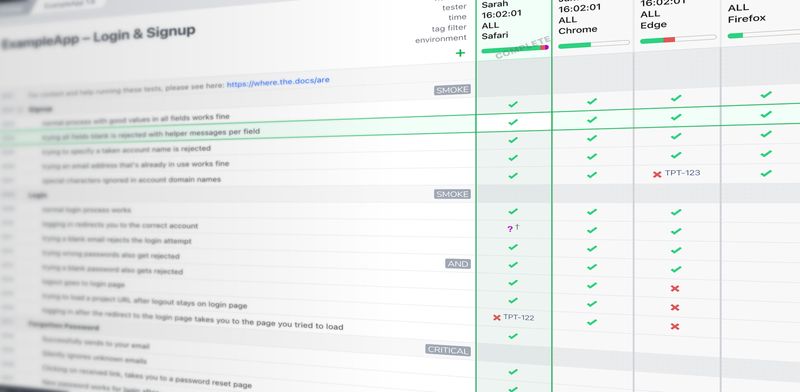
But Testpad was built for exactly this. Each test is a single line of plain text, so writing a test plan is as fast as writing a checklist, and adding a new test is as quick as typing it. You can invite guest testers to specific projects, and share a report link so stakeholders can see how far testing has got whenever they look.
There’s very little to learn: you drag rows to rearrange them, indent rows to group related tests (or to spell one bigger test out over several lines), and comment out non-test rows using shortcuts. Each test run is a column of results, so the grid shows your coverage at a glance. And because it asks so little of testers, they keep their results up to date.
Remember, software testing doesn’t have to be as elaborate and sophisticated as you might think. Start small, see how it goes, then learn and grow from there.
That advice applies to your testing software, too. If Testpad piqued your interest, sign up for a free Testpad account. You can use it for 30 days to decide whether it’s the right software testing tool for you and your team.
Or, if you’re still working up the courage (or your boss’s approval) to start software testing in earnest, check out our blog. We’ve got plenty of articles to get you inspired and up to speed.

If you liked this article, consider sharing
EDITORIALS
The simple yet effective approach to testing that can transform your development process, helping you deliver more reliable software through human insight and real-world usage scenarios.

EDITORIALS
Manual testing is where human judgment meets software quality. This guide covers the types that matter, when to use each, how to plan sessions, and the tools that keep it all organized.

HINTS AND TIPS
Invite guest testers to help you run your tests. Perfect for asking clients to perform User Acceptance Testing, as well as just roping in more help when you're late for a release.